2 April 2026
Building an Automated YouTube Intelligence Briefing: AILC Develops a YouTube Monitoring and Summarisation System!
Leveraging an Agentic Platform and reasoning models to turn hours of video content into a concise, scored briefing.

This report details the architecture and functionality of a sophisticated automated workflow designed by the AI Learning Centre to monitor YouTube channels, extract transcripts, generate AI-powered summaries, and deliver a curated intelligence briefing via email.
The Power of an Agentic Platform
Keeping up with the volume of video content published daily on YouTube requires more than simple subscriptions or notification bells; it requires intelligent orchestration. Our solution utilizes an advanced Agentic Platform—a visual system that acts as a "digital nervous system" for our video intelligence pipeline. It connects the YouTube API, transcript extraction services, AI reasoning models, and email delivery into a single automated process, allowing us to monitor dozens of channels, analyse their output, and filter out noise without needing to write endless code.
The Use Case: Drowning in YouTube Content
YouTube is the world's largest video platform, and for researchers, students, and professionals it has become an increasingly critical source of analysis, commentary, and breaking developments across fields like finance, technology, and policy. The problem is volume. A single channel may upload multiple videos per week, each running anywhere from ten minutes to over an hour. Across a curated list of channels, the output can easily exceed several hours of new content every few days.
Manually watching, evaluating, and summarising this volume of video is impractical. Most of the content may be routine, but buried within it are high-signal updates, breaking developments, and expert analysis that genuinely matter. The challenge is not finding content—it is efficiently identifying which content deserves attention and extracting the key information without watching every minute.
For students and researchers at the AI Learning Centre, the objective was clear: design a system that could systematically monitor a set of YouTube channels, transcribe and analyse new videos using AI, score each video for relevance and impact, filter out noise, and deliver only the highest-value summaries in a clean, readable email briefing.
The Automated Workflow Solution and its Benefits
Key Benefits:
- Time Savings: Eliminates hours of manual video watching and note-taking. A briefing covering dozens of videos can be generated and delivered automatically, with only the most relevant content surfaced for review.
- Signal Over Noise: Leverages AI to objectively score each video across five professional criteria, ensuring that only content meeting a defined quality threshold reaches the reader's inbox.
- Actionable Intelligence: Delivers concise, structured summaries with key points, sentiment analysis, and a credibility assessment for each video—enabling faster and more informed decision-making.
- Consistency: Runs on a reliable automated schedule, providing a dependable intelligence briefing without human intervention.
- Comprehensive Coverage: Monitors multiple YouTube channels simultaneously, ensuring no relevant upload is missed regardless of when it was published.
- Scalability: The architecture is designed so that new channels can be added simply by updating a spreadsheet, with no changes to the workflow itself.
- The workflow operates as an autonomous intelligence agent. It gets triggered automatically every three days at 9:00 AM, executes a series of tasks to discover, transcribe, analyse, and score new videos, and delivers a curated briefing in a single automated run.
Workflow Process Overview
The process begins with a scheduled trigger that activates the workflow on its defined interval. The first task is to retrieve the list of YouTube channels to monitor.
1. Channel Monitoring & Video Discovery
Dynamic Channel List: Rather than hardcoding channel IDs into the workflow, the system pulls them from a Google Sheets spreadsheet. This makes the list easy to update—adding or removing a channel requires only editing the spreadsheet, not modifying the workflow itself.
Channel Resolution: For each channel ID in the spreadsheet, the Agentic Platform queries the YouTube API to resolve the full channel metadata.
Video Search: The system then searches each channel for videos published within the last 72 hours, ensuring complete coverage across the three-day cycle. All matching videos are collected into a single processing queue.
Metadata Logging: Each discovered video's details—title, channel name, publication date, video ID, and content type—are logged to a separate sheet in the same spreadsheet, creating a persistent record of all processed content.
2. Transcript Extraction
Once new videos are identified, the Agentic Platform needs to access their spoken content. The workflow uses a dedicated transcript extraction API to retrieve the full English transcript of each video.
Rate-Limited Processing: To respect API limits and ensure reliability, transcripts are extracted one at a time with a controlled interval between requests. This batched approach prevents throttling while still processing the full queue efficiently.
Resilient Design: The transcript extraction step is configured to continue on error. If a particular video has no available transcript—for instance, a music video or a livestream without captions—the workflow skips it and moves on to the next, rather than halting the entire pipeline.
3. AI-Powered Analysis & Scoring
The intelligence core of the operation is a specialised AI agent powered by xAI's Grok (grok-4-fast-reasoning). Each video transcript is passed to the agent along with a detailed, multi-section prompt that governs exactly how the summary and analysis should be produced.
The AI agent performs two tasks simultaneously for each video: summarisation and impact scoring.
Summarisation
The agent generates a tightly controlled summary for each video, consisting of:
-
Introduction: A single concise sentence identifying the main topics covered.
-
Key Points: One to three factual bullet points capturing the most important information, with timestamps where available.
-
Conclusion: A single sentence summarising the overall takeaway.
The prompt enforces strict word-count limits (70–85 words total) and bans narrative filler, subjective language, and common AI writing patterns. The goal is a summary that reads like a professional briefing, not a chatbot response.
Impact Scoring
Alongside the summary, the agent scores each video across five professional criteria, each rated 0–5:
Market Significance (0–5): How likely is this content to impact a major market, sector, or field of study?
Signal Strength (0–5): Is this verifiable signal or speculative noise?
Source Credibility (0–5): Are claims backed by reliable, primary sources?
Actionability (0–5): Is there a specific, dated event or concrete action the viewer can take?
Novelty (0–5): How new or previously unknown is the information?
The Impact Score is the sum of all five, expressed as a total out of 25.
Additional Analysis
The agent also provides:
-
Sentiment: Positive, Negative, or Neutral.
-
Fake News Risk: A rating of Unlikely, Unclear, or Likely, accompanied by a one-sentence justification.
4. Enrichment, Filtering & Ranking
After the AI agent processes each transcript, the workflow enters an enrichment and filtering phase.
Data Enrichment: The AI-generated analysis is merged with the video's full metadata—duration, view count, and statistics—retrieved from the YouTube Data API. This combines the agent's intelligence output with hard platform data, enabling the final email to display both the summary and contextual information like video length and view count.
Quality Gate: A filter then enforces a strict quality threshold: only videos with an Impact Score of 16 or higher (out of 25) advance to the next stage. This is the critical noise-reduction step. Videos that score below this threshold—routine content, low-novelty uploads, or poorly substantiated material—are automatically discarded.
Ranking: The surviving videos are then sorted in descending order by Impact Score, so the most significant content appears first in the final briefing.
5. Intelligence Delivery
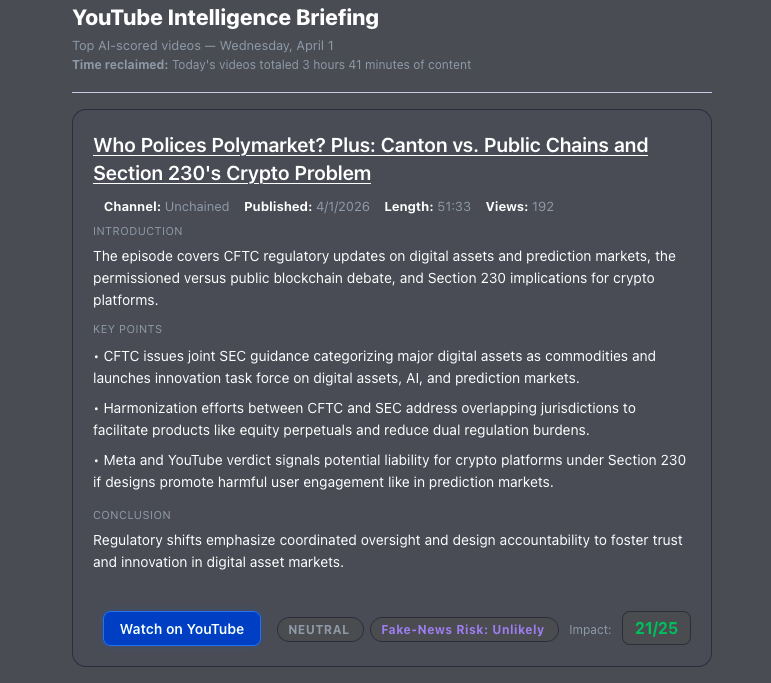
The final stage transforms the filtered, sorted data into a polished email briefing. A code module builds the entire HTML output programmatically, producing a professional, branded email.
What the Email Contains
For each video that passed the quality gate, the briefing includes:
-
Video title (linked directly to YouTube)
-
Channel name and publication date
-
Video duration and view count
-
The AI-generated summary (introduction, key points, conclusion)
-
Sentiment indicator and Fake News Risk rating
-
Impact Score with visual colour coding
-
Time Reclaimed — a calculation showing how much viewing time the summary saved the reader
The email also includes a footer with a scoring legend, explaining the five criteria and the colour coding so recipients can interpret the scores at a glance.
Multi-Audience Delivery
The workflow produces two separate email formats tailored to different audiences:
-
Full Briefing: A detailed version with all metadata, scores, and analysis, distributed to the primary mailing list via Microsoft Outlook.
-
Blackboard Version: A simplified format designed for integration with the university's learning management system, sent to a separate recipient list.
The End Result
The Agentic Platform transforms what would be hours of passive video consumption into a focused, scored, and professionally formatted intelligence briefing. A reader can scan the email in a few minutes and know exactly which videos deserve their full attention—and why. This allows students and researchers at the AI Learning Centre to stay ahead of the curve across multiple domains without spending hours watching and evaluating content manually.
Below is an example of the final intelligence briefing as delivered to the end-user: