17 June 2025
Evolve’s Power Flow Upgrade: Fresh AI Models and a New Conversation Experience
Placeholder subtitle goes here to give a bit more information on the post you’re making. Don’t make this very long, the max length should be about as long as this. Always end on a full stop.

Evolve - PowerFlow Update
Evolve has rolled out some major updates to its Power Flow suite, making it easier than ever to access and work with cutting-edge AI models. The platform now supports the latest models from some of the biggest names in AI—OpenAI, Anthropic, Google, Grok, Groq, and Bedrock. By bringing these models together in one place, Power Flow offers users a flexible, all-in-one solution for tasks ranging from data analysis to creative problem-solving.
One of the key changes is the addition of a new conversation panel, now located on the left-hand side of the screen. This panel gives users a clearer, more efficient way to manage conversations. When opening an old conversation, you’ll no longer see a “continue” button. Instead, a text box appears, allowing you to instantly pick up the discussion or ask more questions without missing a beat.
These updates are a direct response to feedback from users who wanted smoother navigation and an easier way to revisit past interactions. Whether you’re exploring different AI models or revising earlier work, the interface makes switching between conversations and models straightforward and intuitive.
With these improvements, the Power Flow suite has become even more versatile and user-friendly, giving anyone from researchers to creators the tools they need to get the most out of AI. And with this foundation in place, Accelerate is well-positioned to continue adding new features and models as the field evolves.
Parallel and Sequential chat options
Another important update is the removal of Parallel and Sequential chat options. These have been replaced within the new agent-based framework. This change provides a more efficient way to interact with AI by focusing on agents specifically designed for certain tasks or workflows. Agents allow for more precise prompting, enabling users to better customize their experience and achieve optimized results tailored to their needs.
New Chat Conversation
You can now navigate all your chat history from the menu bar on the left-hand side. Once you select a previous conversation, you can continue it in the text box labeled "Type a message."
Chats Type a message


All new Models
All the AI models are categorized here. By selecting a category, you’ll have the option to choose from various models. Take note of the token count displayed below the chat, on the bottom right-hand side.
Models Tokens


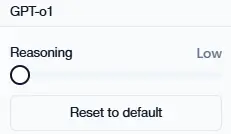
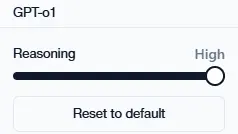
Reasoning
Furthermore, you can select the Reasoning option low, medium, or high. This setting allows the model to generate more detailed responses depending on the level you choose.